Contact
support@echoone.com
Echo One
Henrik
Dalgaard,
Rosenfeldt 40
3600 Frederikssund
Denmark
Phone: +45 47383921

Support
If you don't find the help you need in the manual,
the "read me" or here you are welcome to send an
email.
You will likely get a better answer
if you include
your original images with your
question.
Echo One is in Denmark, in
the Central European Time zone, so be
patient when it is night here.
How To Enter Your Registration
Copy and paste your name and the serial number from the registration email to
DoubleTake. More details on this.
Lost Registration Codes
Send me an email. Your name and address is helpful for looking up your purchase.
|
Installation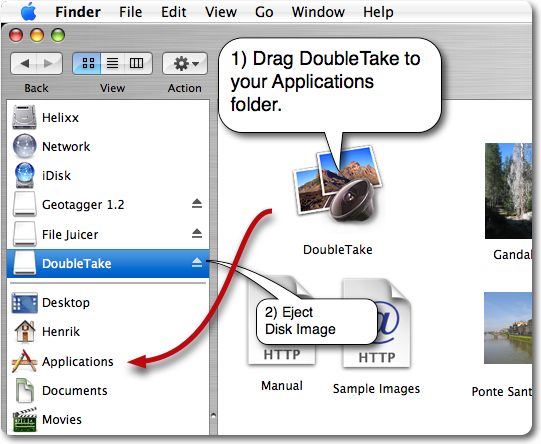
- Download DoubleTake
- Drag DoubleTake to your applications folder
- Eject the disk image
When DoubleTake is running it will appear in the "Dock" on the bottom of your
screen. You can control-click the mouse there to get a menu so you can keep it
there even when DoubleTake is not running. 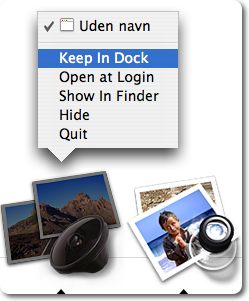
|
|
Watch these screen recordings of how to download
and drag to your applications folder, drag to your
dock and click
eject to eject the disk image.
|
Registration
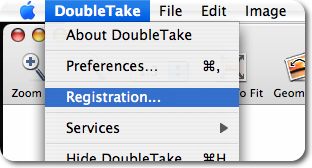
When you have purchased DoubleTake
you will receive an email with the
registration code and registration name.
You enter them via DoubleTake's
registration menu exactly as in the
email. If you have not received the
email it has likely been blocked by a
spam filter. You may check your spam
folder.
Screen
recording showing how to do this.
More details here
After you have entered your code and
name, the "DoubleTake" watermark will no
longer be stamped in the images you
save.
|
Send Images
Many questions get easier to answer
if you show what it is all about. You
can send me large emails if you keep
them under 50 MB. For more exotic
problems I need the original images, not
smaller copies scaled down to email size
(unless they also show the problem).
Also save your panorma as a doubletake
file so I can replicate your exact
layout of the images and the settings
you use.
 An alternative to email is Dropbox which allow you to share 2GB of files for
free (they hope you like this service so much you will buy more space).
Upload your images (archive as zip if more than one) there and send me a
link.
An alternative to email is Dropbox which allow you to share 2GB of files for
free (they hope you like this service so much you will buy more space).
Upload your images (archive as zip if more than one) there and send me a
link.
|
Bug Reports
The better you can describe a problem
the faster I can fix it. Tell me what I
need to do in as much detail you think I
need, and assume I have not seen or
heard about it before.
Screen shots
are most welcome. I will likely ask you
for which version of Mac OS you use or
log files.
You can help me even more if you
send me one of the technical log
files which Mac OS makes when an app
crashes.
17 second video which show you
how to send a crash log
with the Console
application which you find in your
Utilities folder.
|