
Many sites once had flash:Flash Games Download - now out of fashionThe now closed flashgamesdownload.org by Sergio Frumento (Italian/English) with daily suggestions about the most beautiful games to be found on the web.Once Easy downloadsFrom: MiniClips (100+ games on this site) - Now defunct
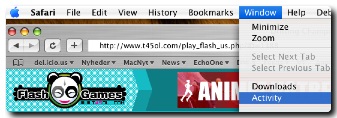
Less easy downloadIf you use Safari as your browser, start the game and then use the "Activity Menu" to find the file ending in ".swf". Doubleclick on it, so the game opens in its own window, and choose "Save" from the File menu. Some of their Flash files are stuck inside EXE files. This is not at all Mac friendly but there are ways to get around it. My other application, File Juicer, may sometimes extract the SWF inside. It may be encrypted or require special Flash add ons which only work on Windows, so Flash extracted this way may not be completly working. LineRider (92 kB) Very cool toy created by Boštjan Cadež in 2006 Nick Jr. Games For kids - ages 0-5 years - also closed Now moved on and no longer Flash basedFrom: http://www.neave.com/games/ (8 classic games)To save them you need the above tip with the Activity menu, but even then they are not really independent of the network. They have also gotten an "almost full screen" mode in the browser. https://www.google.com/search?q=download+flash+games |