File Juicer

DoubleTake 2.X

June 20 2006


Manual for version 2.0 :: Sample Images :: DoubleTake 1.6.2

DoubleTake 2 is now released

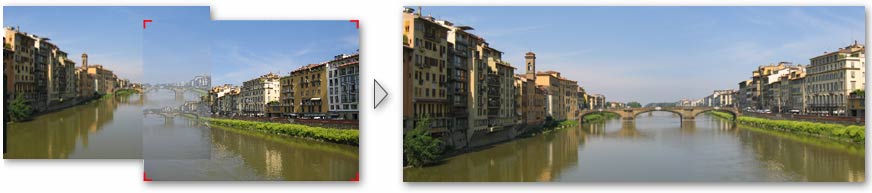
align overlaps

To get it - visit the DoubleTakes home page

Beta releases for 2.1 will arrive on this page.

New Features since 1.6.2

Most of the code is now rewritten to take advantage of Tiger's Core Image graphichs card acceleration. It is of course also a Universal Binary.
  • Adjust and Geometry tools - try the Samples
  • Rotate mode - hit r on keyboard - notice how the corner handles change
  • Scale mode - hit s
  • Free Perspective mode - hit p
  • Normal move mode - hit n
  • Image menu
  • Exposure matching
  • Align button for making manual reorderings snap together
  • Rotation of all selcted images at once via the geometry window.
  • DoubleTake 2 will be a free upgrade for existing users
  • QTVR save option

Bugs

  • Are being tracked in the read me for version 2

Please report bugs to Henrik Dalgaard: feedback@echoone.com

2 Do - Updated June 25

  • Update samples, manual and web site

The Next Version - 2.x

I have no beta versions avaialble yet, but here is a list of feature requests and ideas which may get into it.
  • Icons for the 4 diffrent modes (move/rotate/scale/distort)
  • Implement perspective handling for stitching images arranged in a matrix (for example 2 by 2 images). This is needed to handle images shot with short focal lengths.
  • Flip, 90, 180, 270 degree rotation of selected images
  • Poster Printing
  • Flatting of the cylindrical panorama to remove the cylindrical distortions (hopefully this will work in real time too)
  • Save as Quicktime VR (not expected to be complete in the 2.0 release)
  • 360 degree panoramas
  • Palettes - optional labels
  • Preset values for fisheye effect - and perhaps other things? A secret preferences pane?
  • Tint & temperature adjustment
  • Metadata/spotlight comments in saved file
  • PNG overlay alpha transparency - in separate QTVR layer
  • Name display for arrangements of images (a la growl or HUD)
  • Favourite image order, (left to right for example)
  • Undo on all the transformations
  • Reveal in Finder (edit in other app)
  • More blending options, perhaps intelligent disabling of exposure blending
  • Full screen
  • More than corner handles to show the overlaps
  • Horizontal guiding lines, or grid also for moving images arund
  • Handling of large overlaps
  • Icons for the 3 modes - rotate, scale, perspective
  • Faster "magnet" button - ((auto)align)
  • Keyboard shortcuts - photoshop clones
  • Numbers on sliders
  • Crop Factor (from exif?)
  • Overlaps off/on switcher thing
  • Handle rotation of about 45 degrees better - not that important
  • Tight cropping can be loosened a tiny bit
  • Layered save for Photoshop

Changes from b18 to Final Release

  • Make the handles in overlaps easier to grab with the mouse
  • Rotation now also give an interactive transparent overlap
  • You can rotate around a center you pick yourself. Open the Geometry palette or switch to the rotate mode (hit the r key). Doubleclick the center for rotation and rotate as usual.

Changes to b18

  • Completed the handling of the stitch needed for 360 degree overlap. The left image is duplicated to the right end and can be moved to make things match.
  • Enabled save as QuickTime VR option.
  • Combining Scaling other than 1:1 with saving as QTVR (which is not done yet) end up in black VR movies - QTVR may not make it into version 2.0
  • The saved HTML files (for QTVR) get's appended numbers - this is not intended
  • space-drag for dragging (now it is alt-drag)
  • Fixed: On GeForce2 MX cards (which was used in th 800 MHz QuickSilver G4) the images may not blend correctly. I have not been able to reproduce this bug - it may be a defect graphics card, so if you have one of these Macs I would like to hear from you. This was actually a boblem with monitors set to thousands of colors.

Changes to b17

  • Blends images which overlap more than 50%.
  • Screenshot stitching. This is done automatically on PNG files. It is an extra algorithm for finding the arrangement of images, and this one searches more possibilities faster, and falls back on the photographic algorithm
  • The zoom buttons (+ and -) now snap to 100% - which is nice when dealing with screenshots
  • Drag and Drop from Safari (and other applications which let you drag PNG and TIFF)
  • Auto arrangement now arranges differently exposed images better

Beta 16 (since beta 10)

  • Added blending of images in matrix arrangement
  • Added auto arrangement of images in matrix if they are 2 or 3 columns / rows
  • Sometimes the blends will not be saved in the final file, if no adjustment or geometric corrections are done to the images AND the fisheye filter is turned off
  • Metadata crash is fixed
  • Unintended lines which can appear when stitching 31 (perhaps less can do this) megapixel images.
  • Undo on Match Exposures
  • ICC profile preservation
  • Resolution tag preservation
  • Grayccale mode preservation
  • A few features which are planned for a "pro" version have been prepared . I will release 2.0 before I complete them.

Changed since b8/b9

  • New: Spacers in the toolbar
  • New: Reading the photo arrangement from the file name (I know Canons name scheme)
  • New: Support the new Intel based Macs. It works well with "Rosetta", and the native support is almost done.
  • New: Get Info feature on images.
  • Fixed: DoubleTake was incompatible with VoiceOver. This will be fixed in the next release. If you have turned on VoiceOver, you can switch it off in the preferences or by hitting cmd-F5
  • DoubleTake can now reduce the file size of the final panoramas to managable sizes. Adobe PhotoShop Elements prefers images less than 30000 pixels wide
  • Fixed: Keyboard alignment got lost after rotation
  • fixed: several other minor things

Changed from b7

  • New: Match Exposure in the overlap menu. Works on single overlaps or if you have more selected.
  • New: "Select all overlaps (press option while using the edit menu. "Command-option-A")
  • New: Saving of DoubleTake documents in either: DoubleTake library, Next to the saved file, or next to the source images
  • Fixed: On new Macs (with core image on the graphics card) the fisheye distortion filter does not work on large images - at least not 12MP images. I have not determined the size limit yet
  • Fixed: The fisheye filter was not accurate for short focal lengths
  • Fixed: Reopening a doubletake file from 1.6 may not recreate the overlaps properly
  • Fixed: Reopening a doubletake file from 1.6, the magnet tool may not work
  • Fixed: The slider in geometry palette stop responding while updating the view
  • Fixed: Save could save doubletake documents with the wrong extension - like jpg
  • Done: Progress sheet for saing and loading. Sometimes the "writing..." indicator does not get cleared after saving - redraw problem
  • Done: Recent Menu does not yet handle opening doubletake documents from the library
  • Done: Arrow keys for tweaking geometry
  • Done: Reenable reading of focal exif tags
  • Done: Finer steps on sliders and or keyboard adjustment for the scale and tilt
  • Done: Check that one is not opening the same image twice
  • Done: Disable QuickTime VR (until it works properly - you can try it)

Changed from b6

  • Get rid of the subsampling popup menu - this should be automatic
  • Dirty pixels along the edges problem on Macs with native Core Image support on the graphics card
  • Reload at full resolution on save - this now has some temporary overlap drawing side effects
  • Redraw problems when saving
  • Figure out which subsampling to use automatically
  • Check that memory usage does not get out of hand - make a memory indicator so one knows when to expect slow performance
  • Finer steps on sliders and or keyboard adjustment for the rotation
  • More visible seam handles
  • Palette toggle on buttons
  • Rotation: tight cropping did not fit well
  • Subsampling switcher thing - is now in the custom toolbar instead - should not normally be needed.
  • Save versus Export - a doubletake document is now saved in a DoubleTake library folder
  • (Sampling/transformation options - this was a bug with the sampling menu
  • Bug when dragging in new images after changing subsampling

Changed from b5

  • Palette toggle on buttons
  • Vertical fisheye crop bug
  • Sensitivity or rotation slider
  • Palette layers
  • Focal length slider goes down to 12 mm (is this sane?)
  • Palette titles offset